The Essential Eight Explained and How to Strengthen Cyber Security


Table of contents
Subscribe to newsletter
In an age when cyber threats are ever-present and evolving, organisations need robust cybersecurity strategies to safeguard their data and operations. The Australian government has recognised this imperative and developed a set of prioritised mitigation strategies to help organisations protect themselves against various cyber threats. Among these mitigation strategies, the "Essential Eight" is recognised as the most effective methods in strengthening cybersecurity defences.
In this blog post, we’ll cover:
- What are "Strategies to Mitigate Cyber Security Incidents" and
"Essential Eight"? - What are all the categories and strategies on the strategy list?
- Deep dive into the "Essential Eight"
- What is the Essential Eight Maturity Model (E8MM)?
- Which maturity level is right for my business?
- Implementation priorities for the mitigation strategies
- Use security awareness training and a policy management tool to facilitate your implementation efficiency
What are "Strategies to Mitigate Cyber Security Incidents" and "Essential Eight"?
The Australian Cyber Security Centre (ACSC) led by The Australian Signals Directorate (ASD) has developed a list of strategies for mitigating cybersecurity incidents, known as "Strategies to Mitigate Cyber Security Incidents”. This advisory draws upon the ASD's expertise gained from handling cybersecurity incidents, as well as their experience in conducting vulnerability assessments and penetration testing.
The list of mitigation strategies is divided into five main categories with different recommended strategies. Each of the strategies has its effectiveness ratings and is labelled "Essential", "Excellent", "Very Good" or 'Limited,' to indicate its relative importance in cybersecurity defences.
The "Essential Eight" refers to the eight strategies which are labelled as "Essential" in the list. These eight strategies focus on proactive measures to reduce vulnerabilities and limit potential attack vectors. These strategies are considered foundational and highly effective in providing a baseline cyber defence.
What are all the categories and strategies on the strategy list?

There are altogether 37 strategies on the strategy list and they are divided into 5 main categories. Each category focuses on a specific aspect of cybersecurity. We'll now break down all these 5 categories and explain their relevant strategies.
Category 1: Preventing Malware Delivery and Execution
The first category is about preventing the initial delivery and execution of malware on the organisation’s networking systems. ASD has provided 17 strategies in this first category to help organisations stay safe from threats.
Mitigation Strategies to Prevent Malware Delivery and Execution
Essential
- Application control to prevent execution of unapproved or malicious programs, including .exe, DLL, scripts (such as Windows Script Host, PowerShell and HTA) and installers.
- Patch applications (such as Flash, web browsers, Microsoft Office, Java and PDF viewers). Patch or mitigate computers with “extreme risk” vulnerabilities within 48 hours, and use the latest version of applications.
- Configure Microsoft Office macro settings to block macros from the internet, and only allow vetted macros either in trusted locations with limited write access or digitally signed with a trusted certificate.
- User application hardening. Configure web browsers to block Flash (ideally uninstall it), ads and Java on the internet. Disable unneeded features in Microsoft Office (such as OLE), web browsers and PDF viewers.
Excellent
- Automated dynamic analysis of email and web content run in a sandbox, with content blocked if suspicious behaviour is identified (for example network traffic, new or modified files, or other system configuration changes).
- Email content filtering. Allow only approved attachment types (including in archives and nested archives). Analyse or sanitise hyperlinks, PDF and Microsoft Office attachments. Quarantine Microsoft Office macros.
- Web content filtering. Allow only approved types of web content and websites with good reputation ratings. Block access to malicious domains and IP addresses, ads, anonymity networks and free domains.
- Deny corporate computers direct internet connectivity. Use a gateway firewall to require use of a split DNS server, an email server and an authenticated web proxy server for outbound web connections.
- Operating system generic exploit mitigation, such as Data Execution Prevention (DEP), Address Space Layout Randomisation (ASLR) and Enhanced Mitigation Experience Toolkit (EMET).
Very Good
- Server application hardening, especially internet-accessible web applications (sanitise input and use TLS rather than SSL) and databases, as well as applications that access important sensitive or high-availability data.
- Operating system hardening (including for network devices) based on a Standard Operating Environment, disabling unneeded functionality (such as RDP, AutoRun, LanMan, SMB/NetBIOS, LLMNR and WPAD).
- Antivirus software using heuristics and reputation ratings to check a file’s prevalence and digital signature prior to execution. Use antivirus software from different vendors for gateways versus computers.
- Control removable storage media and connected devices. Block unapproved CD, DVD and USB storage media. Block connectivity with unapproved smartphones, tablets and Bluetooth, Wi-Fi, 3G, 4G and 5G devices.
- Block spoofed emails. Use Sender Policy Framework (SPF) or Sender ID to check incoming emails. Use “hard fail” SPF TXT and DMARC DNS records to mitigate emails that spoof the organisation’s domain.
Good
- User education. Help users avoid phishing emails (for example with links to fake login websites), weak passphrases, passphrase reuse, and unapproved removable storage media, connected devices and cloud services.
Limited
- Antivirus software with up-to-date signatures to identify malware, from a vendor that rapidly adds signatures for new malware. Use antivirus software from different vendors for gateways versus computers.
- TLS encryption between email servers to help prevent legitimate emails being intercepted and subsequently leveraged for social engineering. Perform content scanning after email traffic is decrypted.
Category 2: Limiting the Extent of Cyber Security Incidents
This category focuses on reducing the impact of a cybersecurity incident if it occurs. The relevant strategies are designed to minimise the damage by restricting how far an attacker can move within a network after breaching it. ASD has suggested organisations consider the following 10 strategies.
Mitigation Strategies to Limit the Extent of Cyber Security Incidents
Essential
- Restrict administrative privileges to operating systems and applications based on user duties. Regularly revalidate the need for privileges. Do not use privileged accounts for reading email or web browsing.
- Patch operating systems. Patch or mitigate computers (including network devices) with “extreme risk” vulnerabilities within 48 hours. Use the latest operating system version and avoid unsupported versions.
- Use multi-factor authentication, including for VPNs, RDP, SSH and other remote access. Require multi-factor authentication for all users when they perform a privileged action or access an important sensitive or high-availability data repository.
Excellent
- Disable local administrator accounts, or assign passphrases that are random and unique for each computer’s local administrator account, to prevent propagation using shared local administrator credentials.
- Implement network segmentation. Deny traffic between computers unless required. Constrain devices with low assurance (such as BYOD and IoT). Restrict access to network drives and data repositories based on user duties.
- Protect authentication credentials. Remove CPassword values (MS14-025), configure WDigest (KB2871997), use Windows Defender Credential Guard, change default passphrases, and require long, complex passphrases.
Very Good
- Use a non-persistent, virtualised, sandboxed environment that denies access to important sensitive or high-availability data for risky activities, such as web browsing and viewing untrusted Microsoft Office and PDF files.
- Deploy a software-based application firewall that blocks incoming network traffic which is malicious or unauthorised, and denies network traffic by default (for example unneeded or unauthorised RDP and SMB/NetBIOS traffic).
- Deploy a software-based application firewall that blocks outgoing network traffic not generated by approved or trusted programs, and denies network traffic by default.
- Implement outbound web and email data loss prevention. Block unapproved cloud computing services. Log recipient, size and frequency of outbound emails. Block and log emails containing sensitive words or data patterns.
Category 3: Detecting Cyber Security Incidents and Responding
This category covers strategies for the timely detection of cybersecurity incidents and effective response to contain the breaches, thereby reducing the impact an incident may bring to an organisation. ASD has recommended organisations to take these 6 strategies.
Mitigation Strategies to Detect Cyber Security Incidents and Respond
Excellent
- Continuous incident detection and response with automated, immediate analysis of centralised, time-synchronised logs of allowed and denied computer events, authentication, file access and network activity.
Very Good
- Host-based intrusion detection or prevention system to identify anomalous behaviour during program execution, such as process injection, keystroke logging, driver loading and persistence.
- Endpoint detection and response software on all computers to centrally log system behaviour and support cyber security incident response activities. Microsoft’s free Sysmon tool is an entry-level option.
- Threat hunting to discover incidents based on knowledge of adversary tradecraft. Leverage threat intelligence consisting of analysed threat data with context that enables mitigating action, not just indicators of compromise.
Limited
- Network-based intrusion detection or prevention system using signatures and heuristics to identify anomalous traffic both internally and across network perimeter boundaries.
- Capture network traffic to and from corporate computers that store important data or are considered critical assets, as well as network traffic traversing the network perimeter, to support incident detection and analysis.
Category 4: Recovering Data and System Availability
This category addresses the importance of system recovery. The relevant strategies are critical for ensuring that essential business functions can continue during and after a cyber attack and that data loss is minimised. ASD has suggested 3 strategies for organisations to take.
Mitigation Strategies to Recover Data and System Availability
Essential
- Regular backups of important new or changed data, software and configuration settings, stored disconnected and retained for at least three months. Test restoration initially, annually and whenever IT infrastructure changes.
Very Good
- Business continuity and disaster recovery plans which are tested, documented and printed in hard copy, with a soft copy stored offline. Focus on the highest priority systems and data to recover.
- System recovery capabilities such as virtualisation with snapshot backups, remote installation of operating systems and applications on computers, approved enterprise mobility, and onsite vendor support contracts.
Category 5: Preventing Malicious Insiders
In this final category, ASD has suggested 1 strategy for organisations to handle their personnel management to prevent malicious insiders.
Mitigation Strategy Specific to Preventing Malicious Insiders
Very Good
- Personnel management, including ongoing vetting for users with privileged access, immediately disabling all accounts for departing users, and reminding users of their security obligations and associated penalties.
Deep dive into the "Essential Eight"
The “Essential Eight” refers to the strategies labelled as "Essential" on ASD's migration strategy list. These 8 strategies are recognised as the most important strategies that organisations should implement. They are practical and proven to be effective in mitigating cybersecurity risks. Let's dive into the details and learn how to implement them in your organisation.
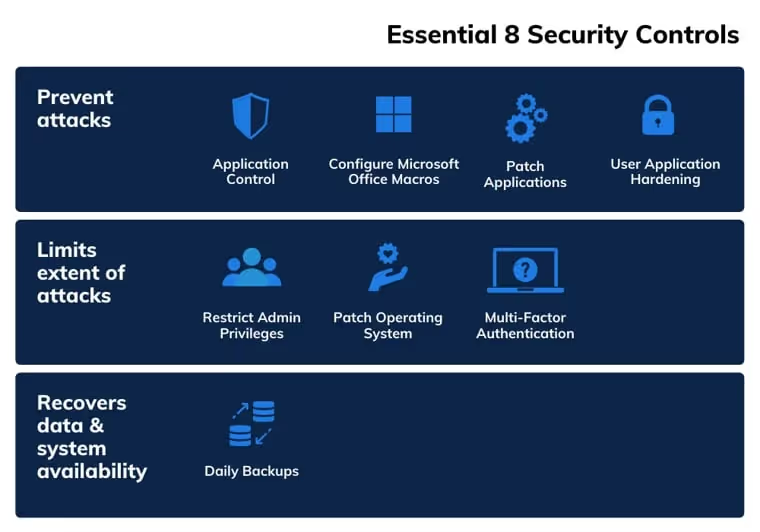
- Essential Eight #1: Application control
- What is it: Application whitelisting is a security practice where organisations create a list of approved and trusted applications that are allowed to run on their systems. Any unauthorised or unapproved applications are blocked.
How it works: By allowing only known, trusted applications to execute, organisations can significantly reduce the risk of malware and unauthorised software running on their systems. This helps prevent various forms of cyberattacks, including those initiated by malicious software.
Implementation: The IT department has the necessary technical expertise to evaluate the functionality, security, and compatibility of various software applications with the organisation's existing systems. The department could draft out a list of authorised applications and configure their systems to block all other applications. - Essential Eight #2: Patch applications and operating systems
- What is it: Regularly updating and patching both applications and operating systems to fix known vulnerabilities and security flaws.
- How it works: Cybercriminals often exploit known vulnerabilities in outdated software. By keeping software up-to-date, organisations close potential entry points for attackers.
- Implementation: Organisations could establish a patch management process to identify, test, and apply patches promptly to applications and operating systems.
- Essential Eight #3: Configure Microsoft Office macro settings
- What is it: Configuring security settings in Microsoft Office to prevent the execution of malicious macros in documents.
- How it works: Malicious macros embedded in Office documents are a common vector for malware delivery. Configuring Office to disable macros by default and only enabling them when necessary reduces this risk.
- Implementation: Organisations can adjust macro settings in Microsoft Office to a higher security level that blocks macros from running unless explicitly allowed.
- Essential Eight #4: User application hardening
- What is it: Restricting web browsers and email clients to minimise their attack surface and reduce the risk of exploitation.
- How it works: By limiting the functionality of web browsers and email clients to only essential features, organisations reduce the likelihood of attackers using these applications as entry points.
- Implementation: Organisations could adjust the settings and configurations of web browsers and email clients to limit potentially risky features, such as scripting or automatic content execution.
- Essential Eight #5: Restrict administrative privileges
- What is it: Limiting administrative access to only those users who require it for their job functions.
- How it works: Reducing the number of users with administrative privileges minimises the chances of unauthorised changes to systems and settings.
- Implementation: Organisations should review and assign administrative privileges on a need-to-know basis, ensuring that non-administrative users do not have excessive access.
- Essential Eight #6: Patch operating systems
- What is it: Like patching applications, keeping operating systems up-to-date prevents attackers from exploiting known security weaknesses.
- How it works: Regularly updating and patching the organisation's operating systems to address known vulnerabilities.
- Implementation: Organisations should establish a process for identifying, testing, and applying operating system patches in a timely manner.
- Essential Eight #7: Multi-factor authentication (MFA)
- What is it: MFA adds an extra layer of security, making it significantly more challenging for unauthorised users to gain access, even if they have the correct password.
- How it works: Requiring users to provide multiple forms of verification (e.g., password and a one-time code) to access sensitive accounts.
- Implementation: Organisations should enable MFA for critical accounts and systems, especially those containing sensitive data.
- Essential Eight #8: Regular backups
- What is it: Data backups provide a means of recovery if data is compromised or lost due to cyberattacks or other incidents.
- How it works: Regularly backing up critical data to ensure it can be restored in the event of data loss, such as ransomware attacks.
- Implementation: Organisations should establish backup policies, including the frequency of backups, storage locations, and testing restoration processes to ensure data integrity.
What is the Essential Eight Maturity Model (E8MM)?
The Essential Eight Maturity Model (E8MM) comprises 4 maturity levels, designed to assess and guide the implementation of the Essential Eight.
-1.avif)
When implementing the Essential Eight, organisations should identify and plan for a target maturity level suitable for their environment. Organisations should then progressively implement each maturity level until that target is achieved.
- Maturity Level 0
- Level Zero suggests substantial vulnerabilities in an organisation's security measures, making them an easy target for adversaries. Organisations functioning at this level face a high risk of breaches in data confidentiality or compromise in the integrity and availability of their systems and data.
- Maturity Level 1
- This is the foundational level, where an organisation has partially implemented some mitigation strategies. However, the implementation may be inconsistent or not fully comprehensive. At this level, while some basic cybersecurity measures are in place, they might not be sufficient to protect against sophisticated cyber threats.
- Maturity Level 2
- At this intermediate level, organisations have implemented most of the strategies. The implementation is more thorough than at Level 1, offering better protection against cyber threats. However, there may still be room for improvement in ensuring that these strategies are applied consistently and effectively across the entire organisation.
- Maturity Level 3
- This is the highest level of maturity, where organisations have fully implemented all Essential Eight strategies. At this level, the implementation is robust, consistent, and managed effectively. Organisations at this level are considered to have a strong cybersecurity posture, capable of protecting against a wide range of cyber threats, including more sophisticated attacks.
The E8MM is regularly updated based on the latest findings from the ASD’s cyber threat intelligence and incident response activities, ensuring it stays relevant to the evolving tactics of cyber attackers.
Organisations are advised to use the most recent version of the E8MM for effective protection against current methods employed by cyber attackers. Older versions of the E8MM may not be effective due to the ongoing advancement in the techniques used by these malicious actors.
Which maturity level is right for my business?
To decide which maturity an organisation should target, an organisation should evaluate their attractiveness to cyber attackers and the potential impact a cyber security breach may bring to them.
Generally speaking, ASD suggests that small businesses with low-risk profiles aim for Maturity Level One, medium-sized businesses with moderate risk profiles target Maturity Level Two, and larger organisations or those with high-risk profiles should strive for Maturity Level Three.
ASD encourages organisations to aim for the highest level of maturity they can achieve. In addition, regular assessments and updates are recommended to maintain or improve their maturity level, especially in response to the evolving cyber threat landscape.
Implementation priorities for the mitigation strategies
When implementing the mitigation strategies, ASD suggests organisations first implement it for high-risk users and computers such as those with access to important (sensitive or high-availability) data and exposed to untrustworthy internet content. After that, organisations could implement it for all other users and computers with relatively lower risk.
Organisations should also perform hands-on testing to verify the effectiveness of their implementation of mitigation strategies.
Use security awareness training and a policy management tool to facilitate your implementation efficiency
Did you know when implementing the mitigation strategies, security awareness training and a policy management tool can tremendously facilitate implementation efficiency? Security awareness training equips employees with the knowledge and skills to act as a first line of defence against cyber threats, while a policy management tool ensures that cybersecurity policies are effectively developed, managed, and adhered to across the organisation. Here are the main benefits you could get from employing these tools.
- Overcome human error
- One of the biggest risks in cybersecurity is human error. Employees who are unaware of cyber threats can inadvertently become the weakest link in an organisation's security.
- Educate your employees
- Training helps employees recognise and understand various cyber threats, such as phishing, malware, and social engineering attacks.
- Cultivate a security culture
- Through awareness training, employees learn to follow best practices, such as using strong passwords, identifying suspicious emails, and securely handling sensitive information etc. This helps to build a better security culture in your organisation.
- Centralised control
- A policy management tool centralises the control and dissemination of cybersecurity policies, ensuring that all employees have access to the latest documents.
- Efficient policy updates and distribution
- As cyber threats evolve, so must policies. Policy management tools facilitate quick updates and distribution of new policies across the organisation, ensuring that all members are informed and aligned with the latest practices.
The above are just a few of the many benefits that security awareness training and a policy management tool can bring you. Take a look at our blog to learn how usecure could help you navigate regulations and standards around the world. Watch a demo to learn more about how our products can help you implement the strategies suggested by the ASD. Get in touch with us now and kick-start your 14-day free trial today!
BOOK A DEMO
See Human Risk Intelligence in action
A 30-minute walkthrough of how to cut human risk across your users, tailored to MSPs and IT teams.
Subscribe to newsletter

Descubre cómo las empresas de servicios profesionales reducen el riesgo humano con usecure
Descubre cómo los equipos de TI de servicios profesionales usan usecure para proteger los datos confidenciales de sus clientes, mantener el cumplimiento normativo y salvaguardar su reputación, sin interrumpir el trabajo facturable.
Related posts
Explore more insights, updates, and resources from usecure.
-2.avif)
Policy Management Isn’t a Compliance Checkbox — It’s a Human Risk Indicator