Employee phishing simulations 101 why how and when to run them
.avif)
.gif)
Table of contents
Subscribe to newsletter
From fake invoices that you have already paid to password expiry messages that link to suspicious login pages, businesses are targeted by phishing attacks every day. Some scams are easy to spot. Others look almost identical to real emails.
With employees around forty percent more likely to encounter phishing scams since 2021, now is the time for decision makers to assess and strengthen staff awareness by running internal phishing simulations.
This guide explains
- What a phishing simulation is
- Why phishing simulations are important
- How phishing simulations work
- Best practices for running phishing campaigns
- How to get started without breaking the bank
What is a phishing simulation
A phishing simulation, sometimes called a phishing test, is where an organisation sends fake malicious emails to its own staff to see how they would respond to a real phishing attack.
For example, if you are concerned about an increase in fake Microsoft emails, you might run quarterly simulations that mimic these messages to identify which users are susceptible and need additional phishing awareness training.
Phishing simulations help you move from assumptions about risk to clear data on how users actually behave.
-2.avif)
Why phishing simulations are important
Many people believe phishing is easy to spot and that only less technical users fall for scams. In reality, phishing remains one of the most successful attack methods. A large share of reported cyber incidents are linked to phishing emails.
Studies show that almost twenty percent of employees are likely to click on phishing links and most of those who click will go on to enter their credentials on a fake website.
To reduce this risk, staff need to understand
- The telltale signs of phishing
- The techniques criminals use
- How and where to report suspicious messages
Phishing simulations support this by giving employees safe practice spotting and reporting attacks and by showing which behaviours need improvement.
How phishing simulations work
Phishing simulations are often part of a wider human risk management approach and are run periodically using different templates and lures. In most organisations the process looks like this.
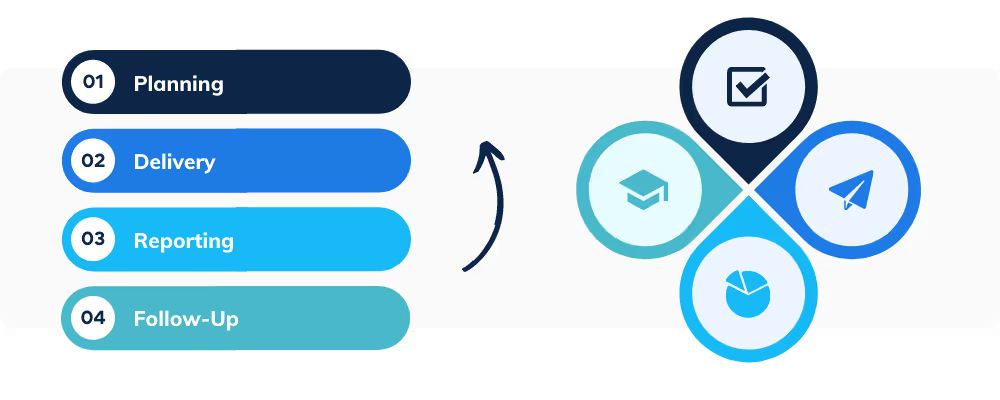
Planning
Before any emails are sent, administrators decide
- Which staff will be included
- How often simulations will run
- Which templates and scenarios to use
- How results will be measured and shared
Delivery
Employees receive simulated phishing emails in their normal inbox. Messages might appear to be from
- A colleague chasing an unpaid invoice
- An email provider asking them to reset an expiring password
- A popular service asking them to verify account details
Results
The simulation tracks key actions such as
- Who opened the email
- Who clicked the suspicious link
- Who downloaded the attachment
- Who reported the email as suspicious
Follow up
Users who click or download are directed to a landing page that explains the simulation, highlights missed red flags and often links to a short training module.
This closes the loop by turning a failure into a learning opportunity.
Best practices for running a phishing campaign
A good phishing campaign closely imitates real attacker tactics. It also has a clear process for planning, running and tracking simulations over time.
Use realistic hooks
Most phishing emails are designed to trigger an emotional response. Common themes include
- Fear such as threats to deactivate an account without urgent action
- Anxiety such as urgent wire transfers requested by a senior leader
- Reward such as prize draws or unexpected bonuses
- Hope such as attachments that reveal winners of an incentive
Your simulations should use similar hooks so employees learn to pause and assess messages that trigger strong emotions.
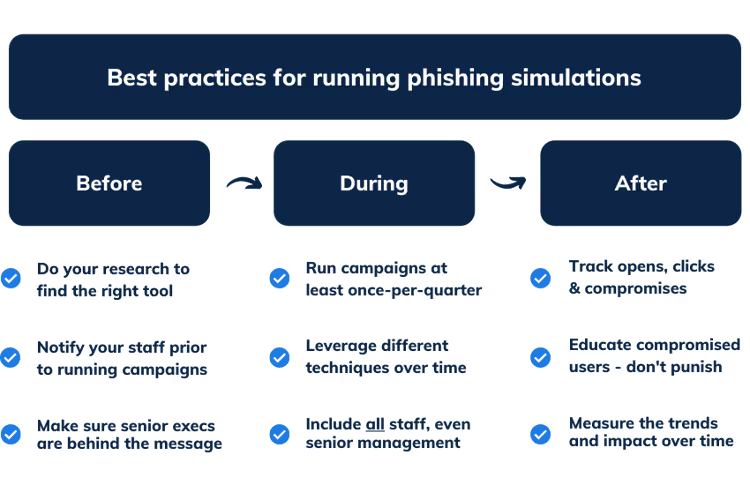
Before the simulation
Find the right tool
Phishing tools range from simple open source scripts to advanced commercial platforms. When you evaluate options, look for a solution that
- Is easy to use with no complex installations
- Includes a library of ready made phishing templates
- Supports automation so campaigns can run on an ongoing basis
- Provides clear reporting on user risk and trends over time
Independent review sites can help you compare features and user feedback.
Notify your staff
Launching simulations without context can create an unhelpful us versus them mindset. Explain why you are running phishing tests, how they work and how they help keep the company, employees and customers safe.
Managers should brief their teams and make it clear that results are used for learning, not punishment. Provide clear internal channels, such as Slack or Teams, where staff can ask questions and share suspicious examples.
Get buy in from leadership
Phishing is not just an IT problem. It affects everyone. Senior leaders need to understand the goals of simulations and actively support the message that security is a shared responsibility.
Consistent backing from executives helps embed a wider security culture rather than leaving simulations as an isolated initiative.
During a simulation campaign
Keep campaigns ongoing
Phishing simulations work best as continuous programmes rather than one off events. Ongoing campaigns allow you to
- Benchmark initial risk
- Measure progress over time
- Monitor new starters and changing teams
Aim for each employee to receive at least one simulation per quarter so you can track trends without overwhelming staff.
Vary your scenarios
Attackers constantly experiment with new themes and lures. Your simulations should do the same.
Include a mix of
- Common scams like fake invoices
- Topical lures based on news events or seasonal themes
- Different brands and services that staff recognise
- Different levels of difficulty
This keeps employees attentive and provides a more accurate picture of risk.
Include everyone
Senior managers and executives are attractive targets because they often have access to sensitive data and financial authority. They should be included in simulations alongside the wider workforce.
Targeted attacks such as whaling, or CEO fraud, can be devastating, so leaders need the same practical experience recognising and reporting suspicious messages.
After a simulation
Track the essentials
After each campaign, review key metrics such as
- Open rate
- Click rate
- Compromise rate such as credential entry or attachment downloads
- Report rate for staff who flagged the email
This helps you see where risk is concentrated and highlights users and teams who demonstrate strong security behaviour.

Educate and reward rather than punish
Early simulations often result in a significant number of users being compromised. How you respond sets the tone for future campaigns.
Focus on
- Providing targeted training to users who fall for simulations
- Recognising and rewarding those who consistently report phish
- Sharing overall company results rather than naming individuals
Avoid shaming or punishing users who fail tests. Fear undermines learning and encourages people to hide mistakes instead of reporting them.
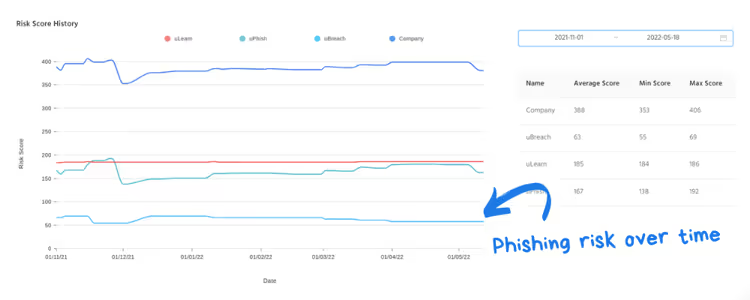
Measure impact over time
Compare results from multiple campaigns to see how your risk level changes. Look for trends such as
- Reductions in click and compromise rates
- Increases in report rates
- Differences between departments or locations
Use these insights to adjust training, scenarios and frequency.
How to get started without breaking the bank
Choosing a phishing solution is often the main barrier to getting started. Look for a tool that allows you to
- Launch simulations in minutes without complex setup
- Use high quality ready made templates
- Track user risk in real time through clear dashboards
Combined with a broader security awareness programme, phishing simulations help turn employees into an active line of defence rather than a weak point.
BOOK A DEMO
See Human Risk Intelligence in action
A 30-minute walkthrough of how to cut human risk across your users, tailored to MSPs and IT teams.
Subscribe to newsletter

Discover how professional services firms reduce human risk with usecure
See how IT teams in professional services use usecure to protect sensitive client data, maintain compliance, and safeguard reputation — without disrupting billable work.
Related posts
Explore more insights, updates, and resources from usecure.

Phishing Simulations MSPs Can Deploy Today

.avif)